
Business Expense Spreadsheet
Original Excel files, Sheets import guidance and printable records.
- Costs, refunds and receipt references
- Monthly totals with clear date boundaries
- Original blank and fictional worked examples
| Entry | Company | Type | Amount (USD) |
|---|---|---|---|
| A001 | A | Expense | 120 |
| A002 | A | Expense | 80 |
| A003 | A | Refund | 20 |
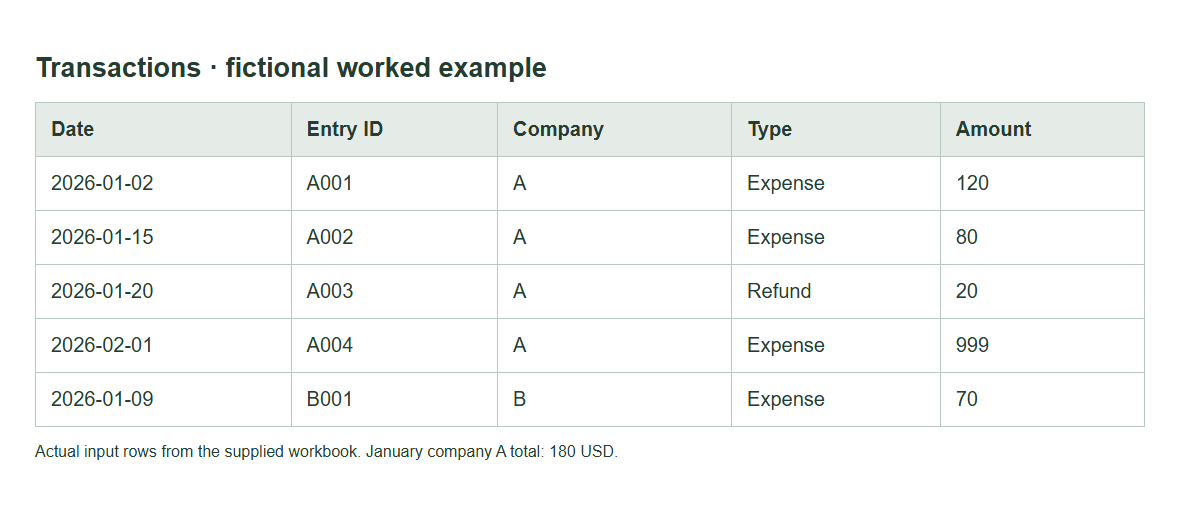
A business expense spreadsheet records costs, refunds and receipt references, then groups the entered amounts by month, company and category so you can review them.
Start with the blank workbook for your own records or the fictional worked copy to check the totals. The pack includes an expense register, income records, a receipt index, project budgets and printable review forms. Use one reporting currency. Keep sources private and check the period before relying on a total. The file organises entered records; it does not determine tax deductions or replace account reconciliation.
Get the free expense workbook pack
The pack is designed for a freelancer or small business that wants to keep a clear manual record. It starts with the transaction rather than a dashboard: who was paid, what the purchase was for, how much it cost and where the source can be found. Summaries then group those entries without asking you to enter the same cost again.
The email signup is currently unavailable. You can inspect the sample and setup instructions below without entering any information. When signup is available, its stated programme is the pack plus practical recordkeeping emails, including software comparisons: 24 emails over about 12 weeks, followed by weekly updates. The same form will provide the terms and privacy information beside the request.
What is inside the business expense spreadsheet pack
| File or tab | Job | Boundary |
|---|---|---|
| Blank and worked XLSX | Enter records or check a fictional month | No macros or bank connection |
| Transactions | Record paid costs and supplier refunds | One reporting currency |
| Income and Cash Movement | Compare received money with recorded costs | Net movement is not tax profit |
| Receipt Index | Connect entries to private evidence | No public receipt storage |
| Expense Report and Claim Balance | Review claims and subtract advances | Approval remains a manual decision |
| Journal | Record debit and credit lines | Balance is an arithmetic check |
| Project Budgets | Compare entered budget and actual cost | No future-cost forecast |
| CSV, DOCX and PDF forms | Transfer input rows or use manual forms | CSV drops formulas; document totals are manual |
The shared workbook also includes travel, per-diem, vehicle and recurring-payment records. Specialist review tabs cover agent records, restaurant budgets, self-employed classifications and unresolved tax questions. They are task records within one pack, not separate systems claiming to automate every part of the business.
Google Sheets use starts with importing a private XLSX copy. There is no hosted Sheets link in this local pack. After import, check formulas and sharing. Keep the original worked workbook to compare its known results with the converted version.
Preview an example month
The fictional company A has two January costs: 120 for office supplies and 80 for travel. It receives a supplier refund of 20 against the office category. Net recorded cost is 180. Company B has its own cost of 70. The A summary does not include B's amount.
| Date | Company | Type | Category | Amount | Signed amount |
|---|---|---|---|---|---|
| 2 January | A | Expense | Office | 120 | 120 |
| 15 January | A | Expense | Travel | 80 | 80 |
| 20 January | A | Refund | Office | 20 | -20 |
| 9 January | B | Expense | Office | 70 | 70 |
| 1 February | A | Expense | Equipment | 999 | 999 |
For January, the start is inclusive and the end is the first day of February, exclusive. The 999 February cost stays outside the January total. A's Office total is 100, and Travel is 80. Those category totals add to 180.
If A also receives 500 from a customer, the income-and-expense version shows net movement of 320. That is 500 minus 180. It is not an audited profit figure. Unpaid invoices, unpaid bills and accounting adjustments need a different or fuller recordkeeping process.
Choose Excel or Google Sheets
Use Excel if a local file fits your review process. The XLSX has fixed input and formula columns, date and amount checks, and print settings. It does not need executable macros. Save a working copy under a clear company and period name before you enter real records.
Use Sheets if a private browser-based file fits the people reviewing it. Import the XLSX, save the converted sheet and verify the worked month. Check the file's folder access as well as its own sharing settings. A filter is a way to view data, not a way to hide one employee's records from another.
Both routes need the same habits: keep source references, check dates and amounts, review exceptions and preserve a period copy. A change of platform does not repair an unclear business purpose or a missing receipt. The file makes those gaps visible so someone can resolve them.
Set categories and record receipts
Choose category labels that answer useful questions about your own spending. Office, Travel and Software are management labels. They do not automatically establish a tax category or deductible amount. Keep a short definition for labels that could overlap.
Give each transaction an entry ID and each source a receipt ID. Keep those IDs stable when you sort the sheet. Put the source reference in Receipt Index, with enough detail to find the document in your own private storage. Avoid placing personal or client details in a description when a private reference is enough.
Enter an amount as a nonnegative number, then choose Expense or Refund. The signed formula handles the direction. Do not enter a negative refund as well as choosing Refund, since that can reverse the intended result in a less guarded file. The supplied validation and error checks are there to catch unsupported inputs.
Read totals and correct errors
Read the selected company, start date and end date before reading the total. A correct calculation for the wrong period is still the wrong answer to your question. Check the last entered row too: the supplied formulas cover rows 2 through 1001. Extend all related ranges before recording more rows.
The Exception column identifies invalid input, duplicate IDs, missing sources and rows still needing review. Resolve the actual cause. A duplicate ID might mean an accidental repeat, or it might mean two events were given the same identifier. Compare the source records before deleting or renaming anything.
Unknown amounts must remain unknown. The closing-cash calculation needs a known opening balance. The project remaining figure needs a known budget. The claim balance needs the actual advance, including a confirmed zero if none was paid. A blank is not evidence that the amount is zero.
For corrections after a period closes, keep a short dated explanation with its source. Save the reviewed version and the corrected version clearly. The goal is to let someone follow what happened without guessing which copy contains the final decision.
Choose a specialised template
Use the income record when you need received-money and paid-cost totals. Use an expense report when a claimant needs review and settlement. Choose the project tracker when costs must be compared with an entered project budget. Keep vehicle distance and travel conversion records separate from the core cost calculation.
The tax organiser holds management categories, source references and unresolved questions. It does not compute allowable deductions. The multiple-company register filters records by ID and does not produce consolidated accounts. Those limits matter when a familiar-looking spreadsheet label appears to promise more than the file actually does.
When to compare software
A manual file can be suitable when one clear process and a manageable set of records meet the need. Repeated missing receipts, unclear edits or a slow close may point to a process problem. Bank imports, approval routing or stronger audit controls may also call for software.
List the required task before comparing products. Receipt capture, employee claims and client billing are different jobs. Our software guides compare those jobs using published vendor information. Start with a copy of your records when checking another tool, and inspect its export before you commit your only live dataset to it.
Who the pack helps
The pack suits a person who can enter records and perform a manual review. It gives the source trail a clear place, with a worked month to check the arithmetic. It is useful when you want to understand the records behind a total rather than hand the task to an unexplained formula.
Choose another process when the work needs stronger access rules, a full ledger or automated approval. The guides explain those boundaries so you can judge the fit before requesting the files. A simple record should do its stated job well without claiming to replace every business system.
Keep live receipts and client details in your own controlled storage. The public samples use fictional data. If you need to report a formula fault, a made-up example is enough to show the problem without exposing your records.
FAQ: delivery and use
Is the spreadsheet a tax calculator?
No. It organises entered records and performs stated arithmetic. Categories help you review costs, but they do not decide whether an amount is deductible. Keep source documents and business purpose information. Check the official rules for the relevant year and situation separately when preparing or reviewing a tax return.
Do I need an email address to inspect the sample?
The public sample and setup instructions are available on this page without signup. Request the complete pack above to open a private download page immediately. Marketing is optional: leave the separate checkbox clear for files only, or select it for the US recordkeeping email programme. Read the programme description and privacy terms before deciding.
Does the pack include a Google Sheets link?
The local pack includes an XLSX that you can import privately into Sheets. It does not contain a pre-created hosted sheet. After import, save the converted file and recheck formulas, dates and access. Use the fictional worked copy to confirm the known month and company totals before entering real records.
Can I edit and print the files?
The original pack permits personal and internal-business adaptation and printing. It does not permit resale or redistribution of the pack. Link to the public preview if you want to cite or recommend it. Keep an untouched copy before editing, then check formulas and print layout after changing the file.
What emails are planned?
The optional programme includes the workbook email and practical recordkeeping emails, including software comparisons: 24 emails over about 12 weeks, then weekly updates. Every email includes unsubscribe and preferences. Viewing this page or requesting files without marketing consent does not enrol you.
Get the pack by email
The signup form is currently unavailable. The sample remains useful for checking the fields and arithmetic. Use the format and topic guides below to decide whether the pack matches the recordkeeping task you want to complete.
Sources and checks
Checked 15 October 2026. The examples are fictional and the arithmetic is original.
- Irs Records: Business recordkeeping and supporting documents.
- Excel Sumifs: Official multiple-criteria sum syntax.
- Sheets Sumifs: Official Sheets multiple-criteria sum syntax.
- Irs Books: Publication 583, December 2024 edition, Recordkeeping System section.
Related records and guides
- income expense spreadsheet
- expense report template
- how to keep track of business expenses
- business expense tracker
- expense sheet multiple companies template
- expense tracker google sheets
- project expense tracker excel
- tax expense spreadsheet
- about
- contact
- affiliate disclosure
- privacy
Verdict on the business expense spreadsheet
Use the business expense spreadsheet for a traceable manual record of costs and refunds. Keep one currency, stable source references and clear date boundaries. A useful total starts with entries you can explain and check.
Keep your records traceable
Inspect the worked month and choose the file that matches your task.